The TiGHT AV USB-C to HDMI Converter (VC-C101U-ETH) solves some of the most common frustrations modern professionals, presenters, and hybrid workers face every day.
You've got a sleek laptop or device with only USB-C ports — but no easy way to connect to a big HDMI display in the meeting room, conference setup, or home office without everything feeling clunky and unreliable.
You plug in a basic adapter, and suddenly:
- The video is laggy, low-res, or drops to 30Hz instead of smooth 60Hz 4K.
- Your device starts draining battery fast during long calls or presentations.
- You need Ethernet for stable internet (Wi-Fi is spotty in big venues), but there's no port.
- You want to hook up a mouse, keyboard, webcam, or external drive — but you're out of ports and juggling dongles.
- Cables everywhere, adapters falling out, and that sinking feeling when "it just doesn't work" right before your meeting starts.
- You need to install a driver
This converter changes all that.
One simple USB-C connection gives you:
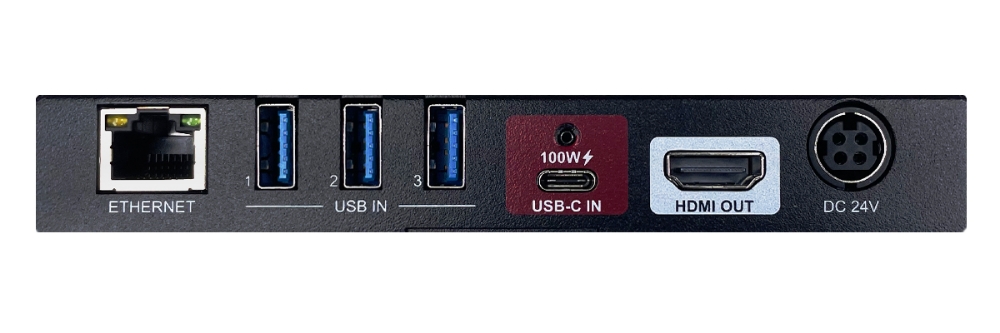
- Crystal-clear, sharp 4K@60Hz video on any HDMI display — perfect for presentations, video calls, digital signage, or detailed work where every pixel matters. No more blurry slides or stuttering video.
- Reliable wired Gigabit Ethernet — say goodbye to dropped Zoom calls or slow uploads in hotels, offices, or conference centers.
- Fast 100W charging — keep your laptop powered up during long sessions without hunting for an extra outlet.
- Three fast USB ports — plug in your peripherals (camera for better video quality, keyboard/mouse for comfort, external storage) without needing a separate hub.
- Plug-and-play simplicity — no drivers, no software headaches, just works.
It's built for real-world reliability: professional AV installations, workstations, meeting rooms, or anyone tired of the "USB-C chaos" and wanting one tidy, dependable solution.
Stop fighting your tech. Reclaim your focus. Connect confidently with TiGHT AV.
Check out the product page here